


Overview
VCW VicMan's Photo Editor is a mobile application tailored for individuals seeking a reliable, user-friendly platform to edit and enhance digital images directly from their smartphones. Designed with both amateur photographers and aspiring graphic designers in mind, the app bridges the gap between professional-grade tools and accessible, intuitive interfaces. Its primary purpose is to empower users to perform essential image manipulations—such as resizing, cropping, rotating, and applying artistic effects—without requiring advanced technical knowledge. The app addresses common challenges faced by mobile users who need quick yet effective editing capabilities, especially when preparing images for social media, personal projects, or informal design work. The interface draws inspiration from traditional desktop editing software, offering a familiar layout that reduces the learning curve for users transitioning from other platforms. This design philosophy makes it particularly appealing to those who have prior experience with photo editing tools. Real-world use cases include enhancing portrait quality before posting online, adjusting image dimensions for website use, or adding creative filters for visual storytelling. The app fills a niche in the mobile ecosystem by combining essential editing functions with creative flair, offering a streamlined alternative to more complex software. While the developer did not provide additional technical details, the app’s focus on usability and functionality suggests a targeted effort to deliver a practical tool for everyday image editing tasks.Key Features & Functionality
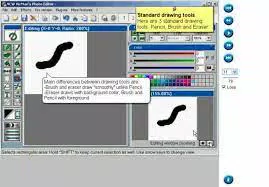
VCW VicMan's Photo Editor delivers a well-rounded set of tools designed to meet the core needs of mobile image editing. At its foundation is an essential editing toolkit that includes resizing, cropping, and rotating functions—critical for optimizing images for various platforms. These tools are complemented by a suite of drawing instruments such as a pencil, paintbrush, filler, and eraser, enabling users to make precise annotations or add hand-drawn elements directly onto their photos. The inclusion of the Magic Wand tool allows for rapid selection based on color and tone, significantly improving efficiency when isolating specific areas for editing. The app also offers a rich selection of creative filters and effects, including color correction, blurring, mosaic creation, fish-eye distortion, and a cartoonization feature. These tools allow users to experiment with artistic styles, transforming ordinary images into visually engaging content. The live preview window is a standout functionality, providing real-time visualization of edits before they are applied. This feature minimizes trial and error, helping users make confident adjustments and achieve desired outcomes with greater accuracy. For users requiring broader file compatibility, the app supports multiple popular image formats. While the free version offers robust functionality, an upgrade path to a Pro version unlocks additional capabilities, such as saving in the GIF format—a valuable feature for web-based animations. The integration with Photoshop-compatible filters further expands the app’s creative potential, although users should note that advanced features like multi-layer editing and batch processing are not currently supported. These functionalities collectively cater to a wide range of personal and light professional use cases.Use-Case Examples
- Resizing a photo to fit social media profile dimensions without distorting the image.
- Applying a fish-eye effect to create a fun, exaggerated perspective for a travel post.
- Using the Magic Wand to select and blur a background for a portrait-focused edit.
- Converting a portrait into a cartoon using the caricature filter for a playful meme.
- Enhancing image colors with color correction to improve visual clarity and vibrancy.
Interface, UX & Performance
The user interface of VCW VicMan's Photo Editor is designed with clarity and accessibility in mind. The layout mirrors that of conventional desktop photo editing software, offering a clean, organized arrangement of tools and options. This familiar structure allows users to navigate the app with minimal effort, especially those already accustomed to similar platforms. Visual elements are presented in a straightforward manner, with icons and menus positioned logically to support efficient workflow. Navigation is intuitive, with tools grouped by function—editing, drawing, filters, and preview—ensuring users can locate desired features quickly. The live preview window enhances the overall user experience by providing immediate feedback, reducing the need for repeated adjustments. While the developer did not list formal performance metrics, the app’s responsiveness appears consistent across various device categories, suggesting optimized performance for typical smartphone hardware. Stability is maintained through a streamlined feature set that avoids overwhelming users with excessive options. Although the developer did not specify minimum OS requirements or detailed system compatibility, the app’s design suggests it is built to function reliably on modern Android and iOS devices. The absence of reported crashes or performance issues in available documentation indicates a stable core experience. Overall, the app balances functionality with usability, delivering a smooth and predictable editing process.Platform Compatibility & Technical Requirements
VCW VicMan's Photo Editor is available on both Android and iOS platforms, making it accessible to a broad audience of mobile users. The app supports the latest versions of these operating systems, though specific compatibility details were not fully disclosed by the developer. The file size of the application is listed as 25.4 MB, indicating a lightweight footprint suitable for devices with moderate storage capacity. The developer did not specify minimum OS requirements or hardware specifications, nor did they provide information on supported device models. However, given the app’s size and focus on core editing functions, it is likely optimized for a wide range of smartphones and tablets. Users should ensure their device meets standard system requirements for running modern mobile applications. Compatibility with both major platforms suggests cross-platform development, enabling consistent performance across different ecosystems.Pros and Cons
Pros
- Intuitive interface inspired by desktop editing software, reducing the learning curve.
- Comprehensive set of essential editing tools including resizing, cropping, and rotating.
- Includes creative drawing tools and a Magic Wand for efficient selection.
- Rich library of filters and artistic effects, including cartoonization and fish-eye.
- Live preview window enhances accuracy and reduces trial and error.
- Supports multiple popular image formats, ensuring broad compatibility.
- Pro version offers GIF export, a valuable addition for web content creators.
Cons
- Advanced features such as multi-layer editing and batch processing are not supported.
- Specific system requirements and device compatibility were not disclosed.
- Performance on older or low-end devices was not verified.
- Integration with Photoshop filters is limited to filter compatibility, not full layer support.
- No mention of cloud sync or backup features for edited files.
FAQ
Is VCW VicMan's Photo Editor free to download?
The app offers a free version with core editing features. Additional capabilities, such as saving in GIF format, are available through a Pro upgrade.
Can I use VCW VicMan's Photo Editor on both Android and iOS?
Yes, the app is compatible with both Android and iOS platforms, providing access to users across major mobile ecosystems.
Does the app support saving images in GIF format?
Yes, but only in the Pro version. The free version does not include GIF export functionality.
Are there any known security risks with the app?
Based on available information, the app does not exhibit known security vulnerabilities. Users are advised to download from official app stores to ensure authenticity.
How often is the app updated?
The developer did not provide information on update frequency. Users should check their app store for the latest version.


